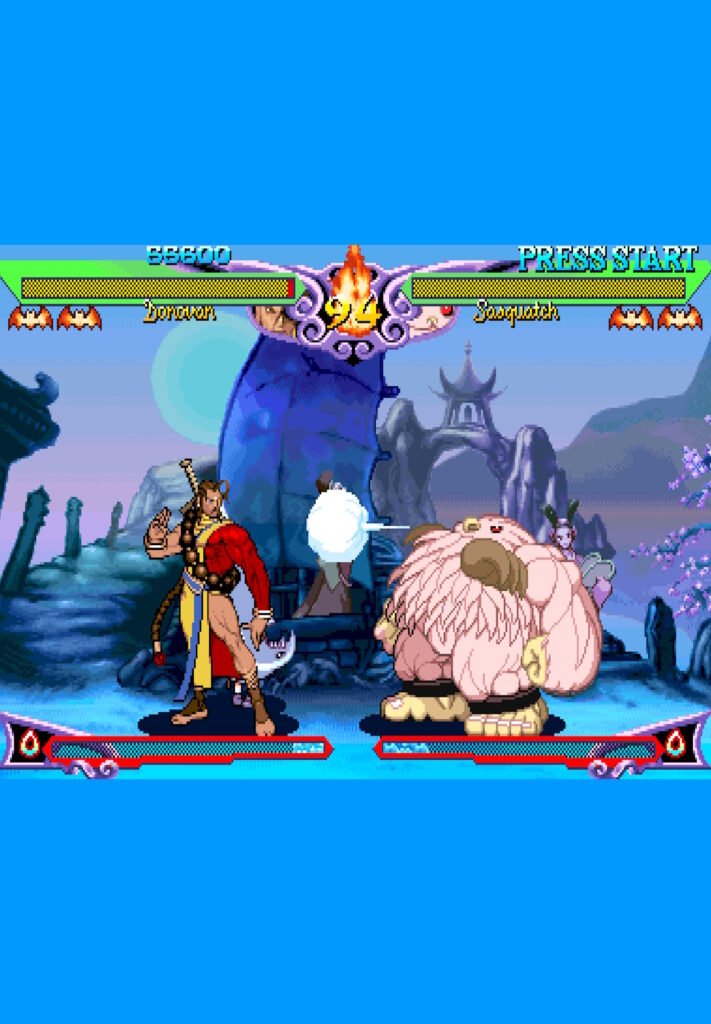
Vampire Hunter 2: Darkstalkers’ Revenge (1997) is an updated version of Vampire Savior (Darkstalkers 3) released for the Capcom Play System II (CPS2) arcade hardware.
Core Systems
- Impact Damage Gauge (Life System): Instead of traditional rounds, the game uses a continuous single-round system.
- Bat Marks: Players start with two life bars (indicated by “Bat Marks”). When one bar is depleted, the fighter briefly falls and then gets up with a full second bar, and the fight continues immediately.
- White Damage: Sustaining hits creates “white health” that slowly recovers over time if the player avoids further damage.
- Dark Force Power: Unlike the character-specific “install” moves in Vampire Savior, Vampire Hunter 2 introduces Dark Force Power.
- Universal Buff: Activated by pressing a punch and kick button of the same strength simultaneously (costs 2 meters).
- Effects: It grants a universal stat boost, turns all damage into non-recoverable “red” damage, and allows access to Air Chain Combos.
- Advanced Defense:
- Push Blocking: A technical maneuver performed by rapidly tapping buttons (3 to 6 inputs) while blocking to push the opponent away.
- Guard Counters: Specialized attacks that can be performed directly out of a block to stop aggressive pressure.
Combat Flow
- Chain Combos: Players can link normal attacks from weakest to strongest (e.g., Light -> Medium -> Heavy) to create rapid, unblockable sequences if the first hit lands.
- Speed & Mobility: The game features extremely fast dashes, air-dashing, and character-specific movement like flight or teleportation.
- Restored Characters: Movesets for Donovan, Huitzil, and Pyron are updated to match the Vampire Savior speed, making them much faster and more viable than in their original arcade appearances.
Leave a Reply