Armored Warriors for the Capcom CPS2 system is an original arcade game from 1994, known for its mech-based beat ’em up gameplay and customizable robot parts. Physical copies are rare and valuable, while the game is more accessible on modern platforms via official bundles.
Set in the year 2281, the story of Armored Warriors (known in Japan as Powered Gear) centers on a conflict between Earth and the planet Raia. After a 50-year war, the two worlds signed a ceasefire, but peace was short-lived.
The Conflict
- The Catalyst: One year after the treaty, the Raian capital, Melkide, is captured by a mysterious army.
- The Invader: The culprit is Azrael, a former Raian captain turned cyborg, who leads a “Cyborg Army” intent on assimilating humans into machines.
- The Mission: The United Earth Government dispatches the elite Red Shield Unit (also called the “Bloody Armor” squadron) to Raia to rescue citizens and eliminate the threat.
- The Twist: Unknown to the public (and the pilots), the Earth government’s secret goal is to use the chaos to bring Raia under Earth’s total control.
The Protagonists & Mechs
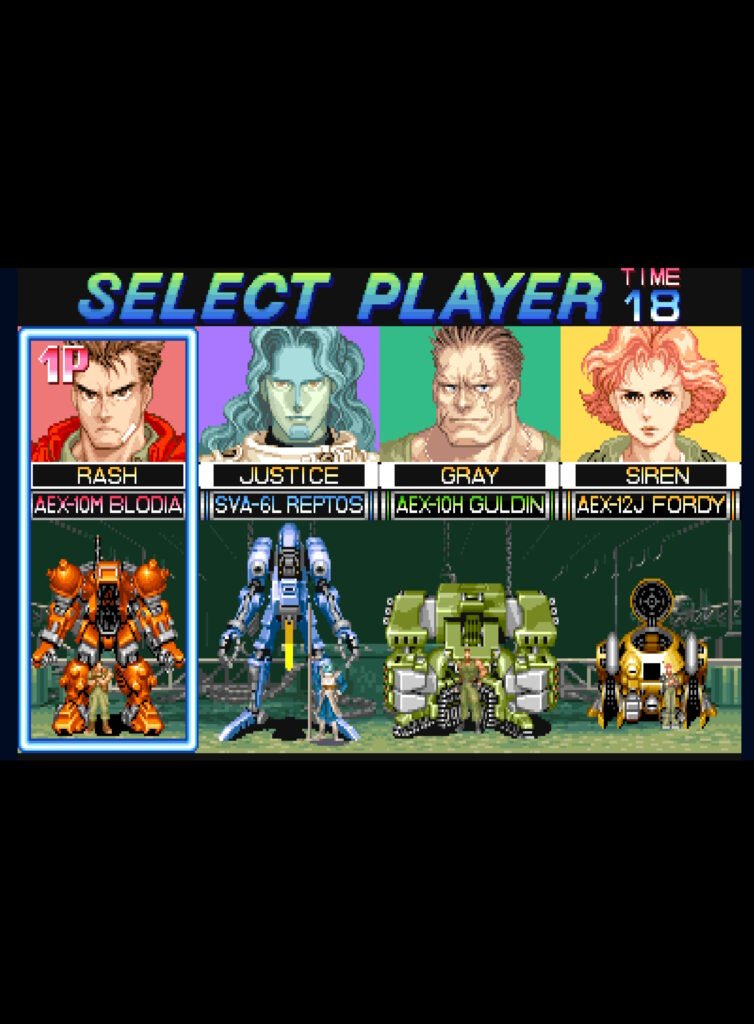
Players choose from four elite pilots, each operating a Variant Armor (VA) unit with unique capabilities:
| Pilot | Callsign | Mech | Specialty |
|---|---|---|---|
| Jeff Perkins | Rash | Blodia | Balanced all-rounder; later appears as Jin Saotome’s mech in Cyberbots. |
| Ray Turner | Justice | Reptos | High-speed, Raian-born “Ambassador of Peace”. |
| Glenn Reed | Gray | Guldin | Heavy-duty “tank” unit with massive power but slow speed. |
| Sarah White | Siren | Fordy | Light, agile mech designed for evasive combat. |
The Conclusion
The war ends in 2283 with a total victory for United Earth forces. After defeating the mastermind behind the cyborgs, the protagonists learn of the Earth government’s true colonialist intentions. Disillusioned, the pilots choose different paths: some retire in guilt, while others, like Rash, go AWOL and never return to the military.